
- 09:00 am - 06:00 pm
- We Serve with Pleasure
- (+88) 01321120650
- Discuss any Queries
Instantly generate SVG and DXF files with the AI Design Generator.
- 0 Comments
- By admin
- Uncategorized
Transforming simple shapes into intricate designs can be done effortlessly without the need for installation.
Weed and peel clean — professional die-cut stickers – the cut lines up with the print every time.

This tool takes the hassle out of drawing cutlines manually in design software. You can then adjust the cutline distance from your image and it’s smoothness.
This makes sure your stickers are cut exactly how you want — with a clean, professional finish. In just a few seconds, it creates a vector cut path (also called a die-cut line) around your artwork, ready for printing. Customize piece count, shape, and connector style.
Create multi-color puzzles by assigning different materials per piece. Click the export button and choose “Pieces SVG (ZIP)” or “Pieces PNG (ZIP)” to download all individual pieces. Cut each piece from different materials or colors for stunning multi-material puzzles. If you want to check the math — the code that draws every box is open source.
Reselling the cut files themselves requires a Supporter or Pro membership, and files you made as a member can still be resold after the membership ends. Every account tier may sell physical boxes made from these files. You can also use laser-grade plywood for a natural look or solid color acrylic for vibrant, modern designs. Our SVG files work with various materials. Create custom finger-jointed boxes with precise dimensions. Each laser and material combination may need slightly different finger joint settings for the perfect fit.
High-quality outputs for launches, merch, and packaging
Within your browser (a logo), drawing, or sticker design gets converted into a cut file with layers tailored for your machine, while cleaning up specks and highlighting thin areas. The free toolkit Makerfern — designed for Cricut, Silhouette, laser cutting, and stencils, operates directly in your web browser to convert images to SVG. Be specific about style, details, and intended use. You can modify the built-in modifiers’ code or utilize those shared by the community.
Create editable vector graphics from a simple prompt. Add your design to templates (mockups), product visuals, packaging layouts, and social launch assets. Customize your generated vector by editing colors (composition), typography, borders, opacity, and shadows. Transform simple text prompts into clean, editable vector art. Create scalable vector artwork that stays crisp across packaging, stickers, merch, social posts, and print assets. Generate vector graphics with AI, then adjust colors, shapes, layout, typography, shadows, and more inside Kittl.
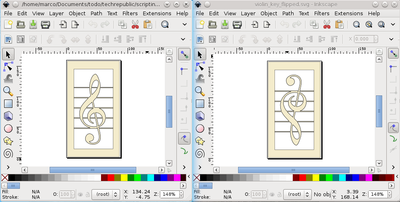
To ensure precise fitting of parts, use the Offset tool in the Vector tab to enlarge the shape by half the kerf. A thin strip of material, referred to as the kerf , typically between 0.1 to 0.3mm,, is burned away by the laser beam. Indeed, SVG and DXF files exported maintain their actual dimensions and are compatible with LightBurn, xTool Creative Space, Glowforge, RDWorks, and other software that supports SVG or DXF formats. The advanced mode introduces an Illustrator-style tool panel equipped with keyboard shortcuts, rulers, point editing, and pathfinder, available when needed.
Contemporary gift bag.
Use the pen tool to draw vector paths, then refine your design by modifying the nodes. A rapid and efficient SVG editor is crucial for every creative team. This software is user-friendly (produces clean layers), and significantly reduces design time. Spending less time in software translates to more time available for cutting (engraving), and printing. Create finger-jointed boxes, trays, lids, and dividers that are sized for your material and ready to cut with just one click. Convert any area into a collection of laser-cuttable vector layers , such as streets, water, and terrain,, prepared for cutting, engraving, and assembly.